2 min readUpdated  TuneSera
On this page
Every station has its own page with its logo, description, live player, details and links. Choose which sections appear and, with Pro, how the page is laid out.
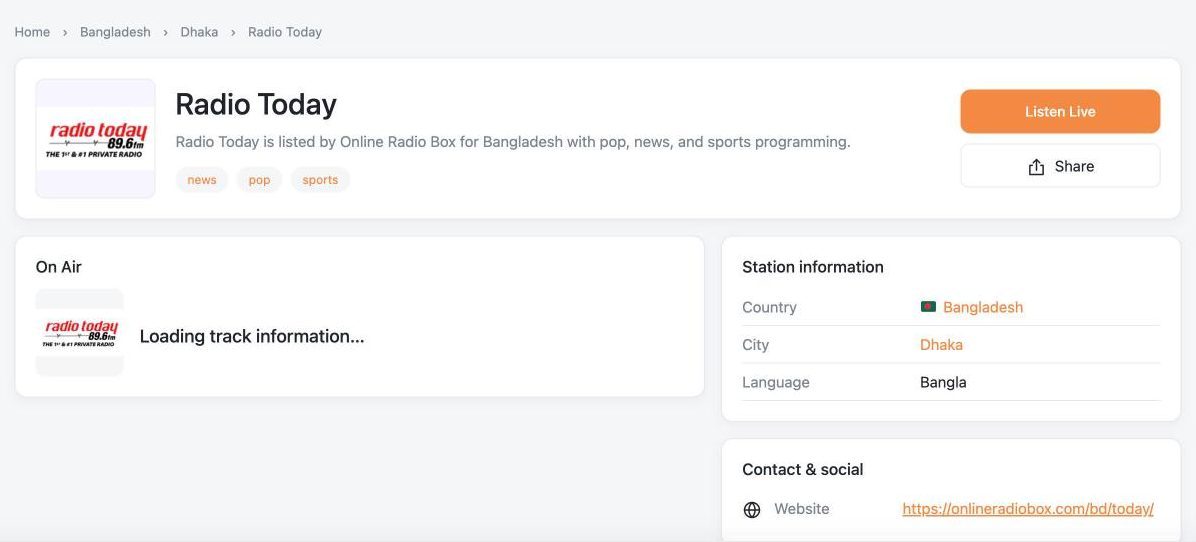
What a station page shows#
- A breadcrumb showing the station’s country and city.
- The logo, name, description and genre links.
- Listen Live to play the station in the sticky player, and Share.
- On Air: the current song, when the station shares it.
- Station information: country, city, language, broadcast type, frequency and timezone.
- Contact & social: website, email, phone and social profiles.
- Related stations below the details.
Station pages also include structured data (RadioStation schema) that helps search engines understand your stations.
Choose which sections appear#
Go to TuneSera → Settings → Layout → Station page:
- Show breadcrumbs
- Show station description
- Show genre links
- Show location and broadcast information
- Show contact information
- Show social links
- Show Wikipedia link
- Show related stations
Sections with no information, such as contact details for a station without any, are hidden automatically.
Page layout options#
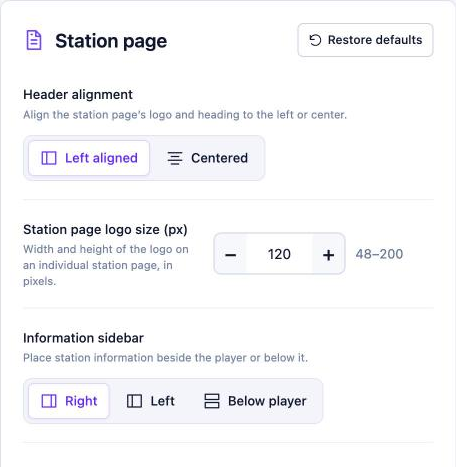
Pro: Fine-tune the layout: Header alignment (left aligned or centered), Station page logo size (48–200 px), Information sidebar (right, left or below the player), Related station limit (1–12) and Place contact before station information. Get TuneSera Pro
Station page addresses#
Station pages use the address yoursite.com/station/station-name/. Change the station part in TuneSera → Settings → URLs and Pages.