1 min readUpdated  TuneSera
On this page
This guide shows you how to install and activate the free TuneSera Internet Radio Directory plugin. It takes about two minutes.
Before you start#
Make sure your site meets these requirements:
- WordPress 6.6 or newer
- PHP 7.4 or newer
- An administrator account on the site
Install from your dashboard (recommended)#
- In your WordPress dashboard, go to Plugins → Add Plugin (called Add New Plugin in older WordPress versions).
- In Search Plugins, type TuneSera.
- Find TuneSera Internet Radio Directory by WPSera and click Install Now.
- When the installation finishes, click Activate.
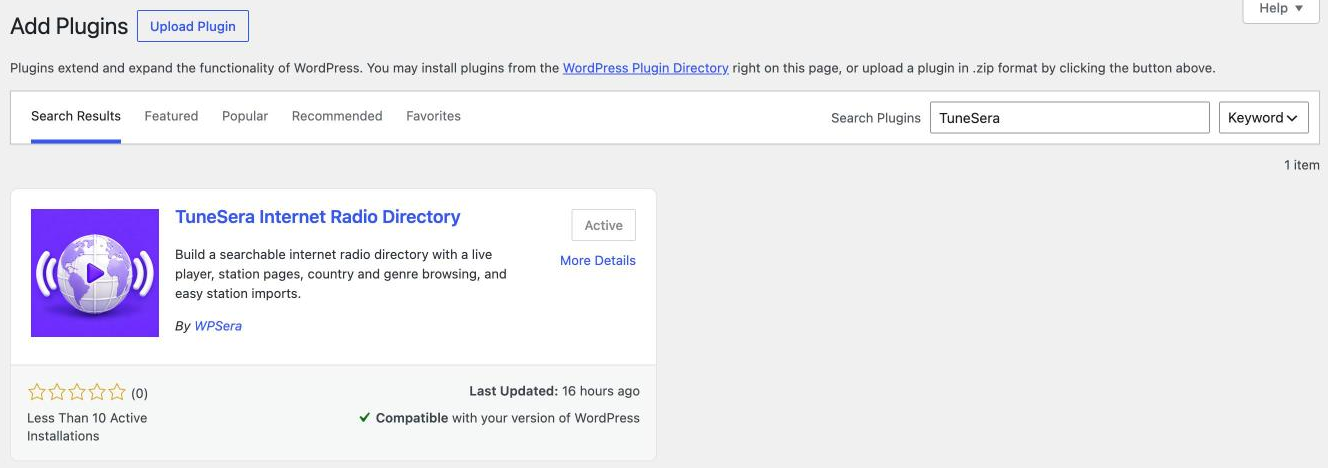 Search for TuneSera and install TuneSera Internet Radio Directory by WPSera. (On this site it is already active.)
Install from a ZIP file#
Use this method if you downloaded the plugin ZIP, for example from WordPress.org.
- Go to Plugins → Add Plugin and click Upload Plugin.
- Click Choose File, select the TuneSera ZIP file, then click Install Now.
- Click Activate Plugin.
What happens after activation#
The first time you activate TuneSera, WordPress takes you straight to the Setup Wizard. If you have already finished the wizard on this site, you go to the TuneSera Dashboard instead.
You will also find a new TuneSera menu in your dashboard sidebar:
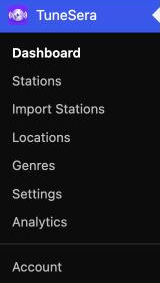
- Dashboard – your setup checklist, station totals and quick links.
- Stations – all your radio stations, where you can add and edit them.
- Import Stations – import from the bundled directory or a CSV file, and see your import history.
- Locations – browse and manage countries, divisions and cities.
- Genres – organize stations by genre.
- Settings – player, layout, design, shortcodes and advanced options.
- Setup Wizard – shown until you complete setup. You can always reopen it from the dashboard with Review setup.
Planning to use Pro later? Install and activate the free plugin first. TuneSera Pro is a separate add-on that runs alongside it and needs the free plugin to stay active.
Next step#
Continue with Run the setup wizard to create your directory page and add your first stations.
Deactivating TuneSera never removes your stations or settings. Data is only removed when you delete the plugin and have turned on Remove plugin data on uninstall under TuneSera → Settings → Advanced.