2 min readUpdated  TuneSera
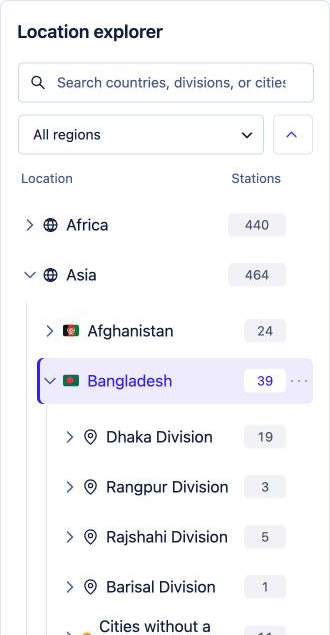
TuneSera organises stations by where they broadcast from. Locations power the country filter, the browse pages and the public archive page for every country, division and city.
The four levels#
| Level | Example | Notes |
|---|---|---|
| Region | Asia | Seven predefined regions: Africa, Asia, Europe, North America, South America, Oceania and Antarctica. They group countries in the Location explorer. |
| Country | Bangladesh | Every station needs a country. Countries show their flag throughout your directory. |
| Division | Dhaka Division | A state, province or division within a country. Optional. |
| City | Dhaka | Belongs to a division, or directly to the country if it has none (“Cities without a division”). |
Where locations come from#
- Imports create countries, divisions and cities automatically from the station data.
- The station editor lets you tick a country (and division) and city for each station, or add new ones.
- TuneSera → Locations lets you add, rename and organise them directly.
Where visitors see locations#
- The country filter and optional country, division and city sidebars in the directory.
- Each station card and station page shows the station’s country and city.
- Location archive pages, for example
/country/bangladesh/. - The country browse page and, with Pro, the
[tunesera_locations]shortcode.
Station counts only include published stations, so a country with 0 stations won’t show up in the directory filters.
Related articles#
Was this article helpful?