2 min readUpdated  TuneSera
On this page
Search and filters help visitors find a station in seconds. Choose which tools to show, how results are sorted, and how many stations appear per page.
Choose which search tools visitors see#
Go to TuneSera → Settings → Layout → Search & filters. The Live preview on the right updates as you change settings.
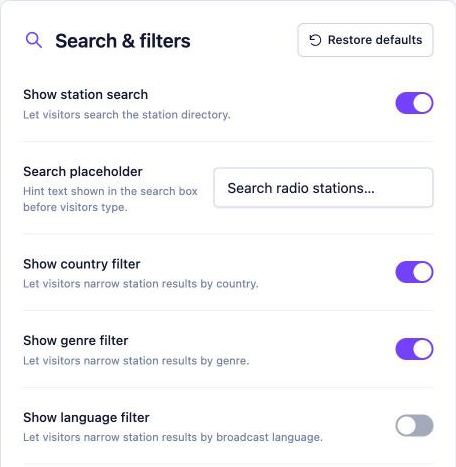
- Show station search: a search box for station names. Change its hint text in Search placeholder.
- Show country filter, Show genre filter, Show language filter: dropdown filters above the station list.
- Show selected filter chips: small labels for each active filter, with an × to remove it.
- Show reset filters button: clears all filters at once.
- Show result count: for example, “39 stations · Showing 1–20 of 39”.
Default sorting and stations per page#
Go to TuneSera → Settings → Layout → Directory:
- Default sorting: Alphabetical or Newest.
- Stations per page: from 1 to 100.
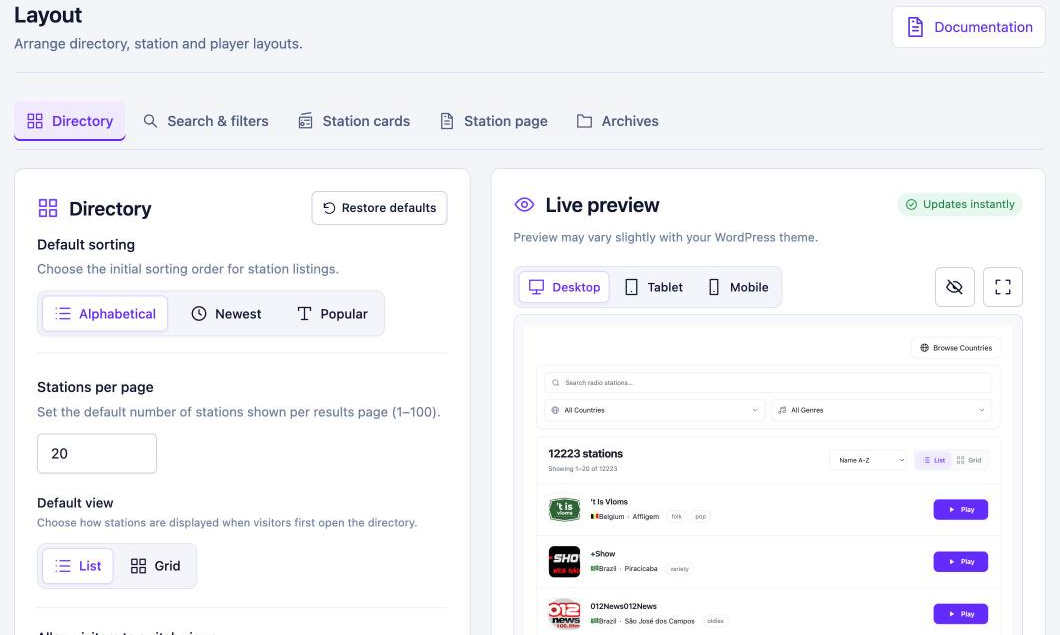
Pro: The Popular sort orders stations by how often they are played on your site. See Popular stations. Get TuneSera Pro
Visitors can also change the order themselves with the sort menu: Recently added, Name A-Z or Name Z-A.
Visitors’ choices are remembered#
When a visitor filters, sorts or switches view, the directory remembers it for their next visit, so they pick up where they left off. This uses a first-party cookie (tunesera_listing_initial, 30 days) and browser storage. It is never used for tracking.
Turn off filters you don’t need. For example, if all your stations are in one country, hide the country filter for a cleaner page.