2 min readUpdated  TuneSera
On this page
Genres group stations by style, such as pop, news or jazz. Visitors use them to filter the directory and browse your stations, and each genre gets its own page.
Open the Genres screen#
Go to TuneSera → Genres. You will see every genre with its slug and the number of stations that use it.
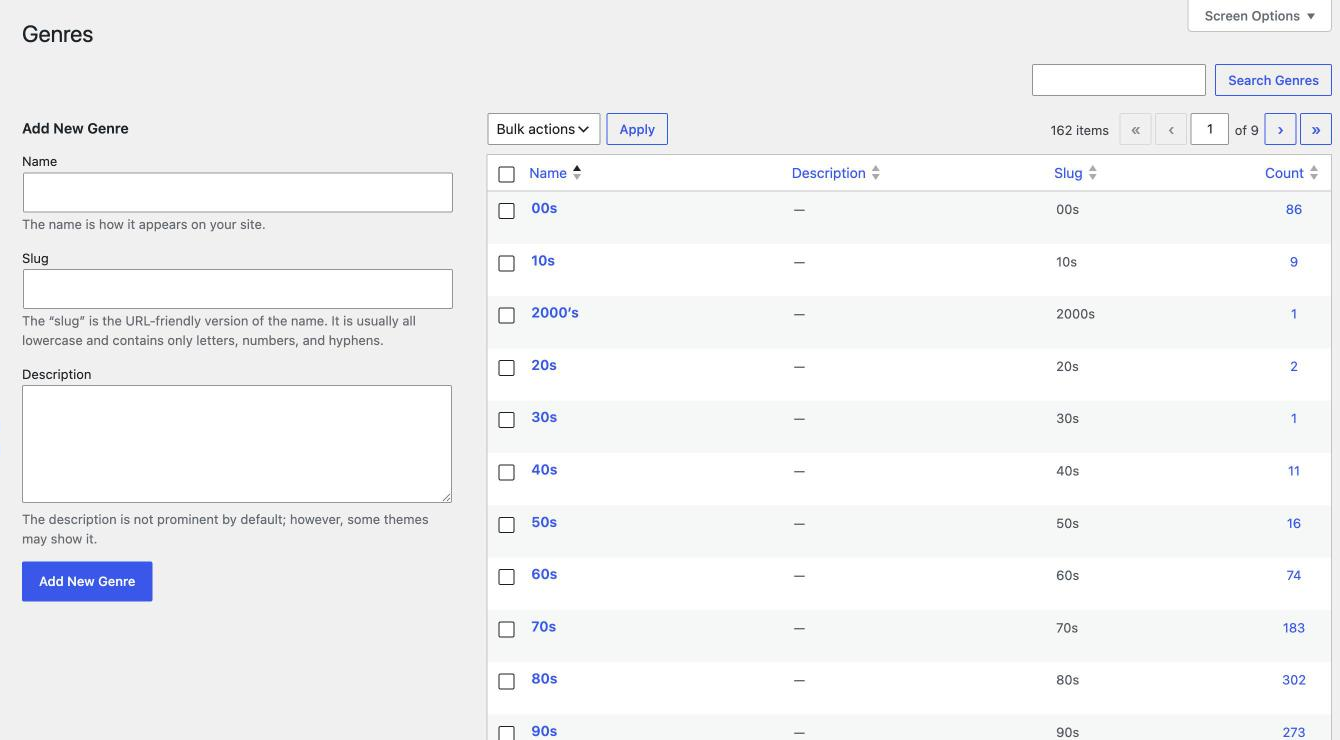
Add a genre#
- Under Add New Genre, enter a Name.
- Optionally enter a Slug (used in the genre page address) and a Description.
- Click Add New Genre.
You can also add genres straight from the station editor: type them in the Genres box and click Add.
Edit or delete a genre#
- Hover over a genre and click Edit to rename it or change its slug and description, or Quick Edit for just the name and slug.
- Click Delete to remove a genre. The stations stay. They just lose that genre.
- To delete several genres, tick them, choose Delete from Bulk actions and click Apply.
Merge similar genres#
Imports can bring in near-duplicates, such as “hip-hop” and “hip hop”. To merge them:
- Go to TuneSera → Stations and filter by the genre you want to remove.
- Select all stations, choose Bulk edit, add the genre you want to keep, and click Update.
- Delete the unwanted genre from TuneSera → Genres.
Genre pages#
Every genre has a public page listing its stations, for example yoursite.com/genre/jazz/. Change the genre part of the address under TuneSera → Settings → URLs and Pages. Show all genres to visitors with the [tunesera_genres] shortcode.
Keep genre names short and consistent. A smaller set of clear genres makes the genre filter much easier to use.