2 min readUpdated  TuneSera
All TuneSera options live in one place: TuneSera → Settings. Here is a map of every tab and how saving works.

The settings tabs#
| Tab | What it controls |
|---|---|
| URLs and Pages | Your directory page and the addresses of station and archive pages. See URL structure and slugs. |
| Player | The sticky player, its controls, playback and the sleep timer. See The sticky player. |
| Metadata | Current-song information and its caching. See Now-playing metadata. |
| Layout | Directory, search and filters, station cards, station pages and archives. |
| Design | Colours, typography, spacing and buttons. See Colors and presets. |
| Local discovery (Pro) | Starting visitors on their own country. See Local discovery. |
| Analytics (Pro) | Collection, privacy, storage and email reports. |
| Shortcodes | The shortcode builder. See Using the shortcode builder. |
| Advanced | Auto-save, sharing, caches, backups, diagnostics, maintenance and uninstall. |
Saving your changes#
By default, settings are saved automatically a moment after you change them. To review changes before saving, go to Advanced and turn off Automatically save settings. You then click Save changes at the top right.
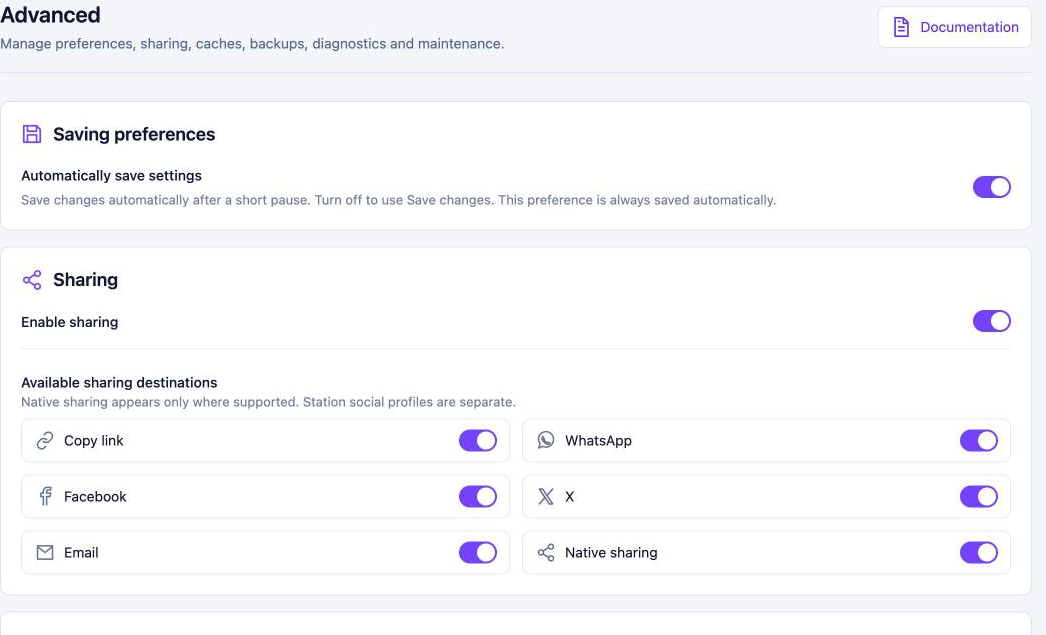
- Restore defaults on a section resets just that section.
- The Live preview on the Layout and Design tabs shows changes before visitors see them.
- Each tab has a Documentation button that opens the matching guide.
In the free plugin, Pro-only options are shown with a PRO badge so you can see what is available.
Related articles#
Was this article helpful?