2 min readUpdated  TuneSera
On this page
Once your directory page is live, add it to your site menu so visitors can find your stations from any page. How you do this depends on your theme.
The quickest way in: go to TuneSera → Dashboard and click Edit menus next to Add the directory to your menu. TuneSera opens the right screen for your theme.
Classic themes: Appearance → Menus#
Use these steps if your dashboard has an Appearance → Menus screen.
- Go to Appearance → Menus.
- Under Select a menu to edit, choose the menu you want, such as your main menu, and click Select.
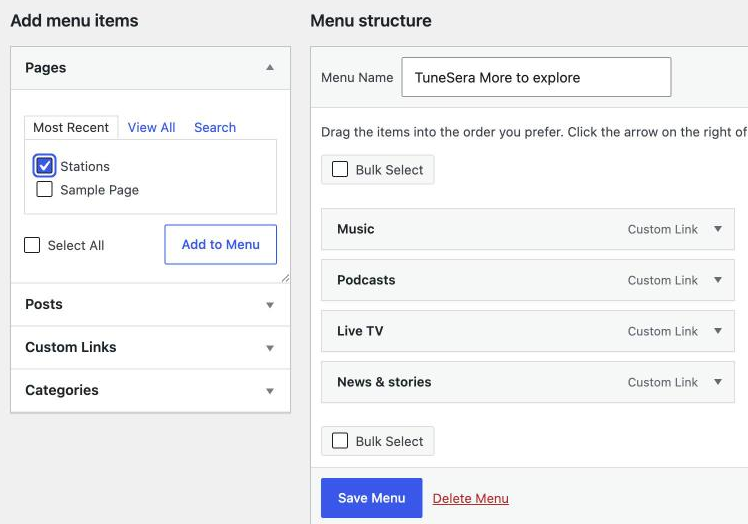
- In Add menu items, open Pages and tick your directory page. It is called Stations unless you gave it a different name. If you can’t see it, click View All or Search.
- Click Add to Menu.
- Drag the new item to where you want it in Menu structure.
- Click Save Menu.
Block themes: the Site Editor#
Use these steps if your theme uses the Site Editor (you will see Appearance → Editor instead of Menus).
- Go to Appearance → Editor and open Navigation.
- Select the menu your header uses and click the edit (pencil) icon.
- Click the + button to add a link, search for your directory page, and select it.
- Click Save.
If your navigation uses the Page List block, it already shows all your published pages, including the directory page.
Check it worked#
Visit your site and click the new menu item. Back on TuneSera → Dashboard, the Add the directory to your menu item in the Getting started checklist now shows a green tick.
Don’t know which page is your directory? Check the Directory details panel on the TuneSera dashboard. It shows the page name and its address.