2 min readUpdated  TuneSera
Every country, division and city in your directory gets its own public page listing its stations. These archive pages are great for visitors and for search engines.
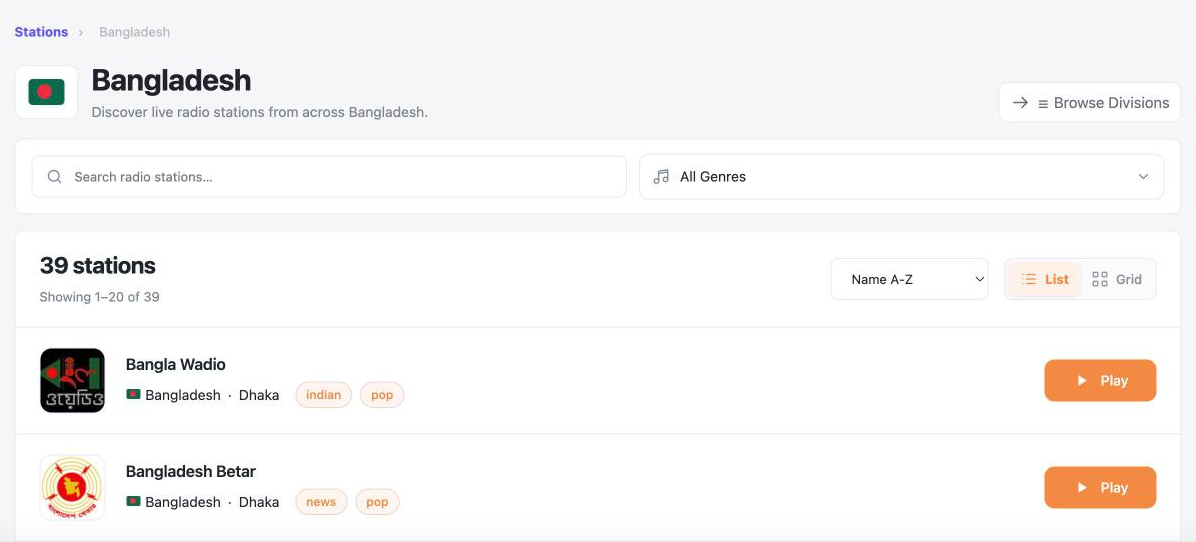
Archive page addresses#
| Location | Example address |
|---|---|
| Country | yoursite.com/country/bangladesh/ |
| Division | yoursite.com/division/dhaka-division/ |
| City | yoursite.com/city/dhaka/ |
Change the country, division and city part of these addresses in TuneSera → Settings → URLs and Pages, or in the setup wizard’s Advanced URL settings.
To find a location’s address, select it in TuneSera → Locations. The Archive page panel shows the link with a Copy button.
What an archive page shows#
- A breadcrumb back to your directory.
- The country flag, location name and a short description.
- Search and filters, the station count, sorting, and the list or grid switch.
- A browse button for the next level down, such as Browse Divisions on a country page.
- The stations in that location. Every station plays in the sticky player.
Customise archive pages#
Go to TuneSera → Settings → Layout and open the Archives section:
- Show breadcrumbs
- Show archive description
- Show country flag
Pro: Give archive pages their own layout. Turn off Use directory view and columns, then choose the Archive default view (list or grid) and Archive desktop columns. Get TuneSera Pro
Link to your most popular country pages from menus or blog posts. They make great landing pages for listeners searching for radio in a specific place.