By default only administrators can manage StreamSera. With StreamSera Pro you can give other people exactly the access they need, for example a host who manages their show, or a volunteer who moderates song requests.
Roles added by StreamSera Pro#
| Role | What they can do |
|---|---|
| Station Manager | Runs the station: stations, players, schedule and requests. |
| Radio Host | Works on the schedule, shows and hosts. |
| Request Moderator | Approves, rejects and plays song requests and shout-outs. |
These roles have fixed permissions. Give one to a person under Users: edit the user and choose the role, or use Change role to… on the users list.
Give existing WordPress roles access#
Go to StreamSera → Settings → Access & data → Who can manage StreamSera. Tick what each role can open:
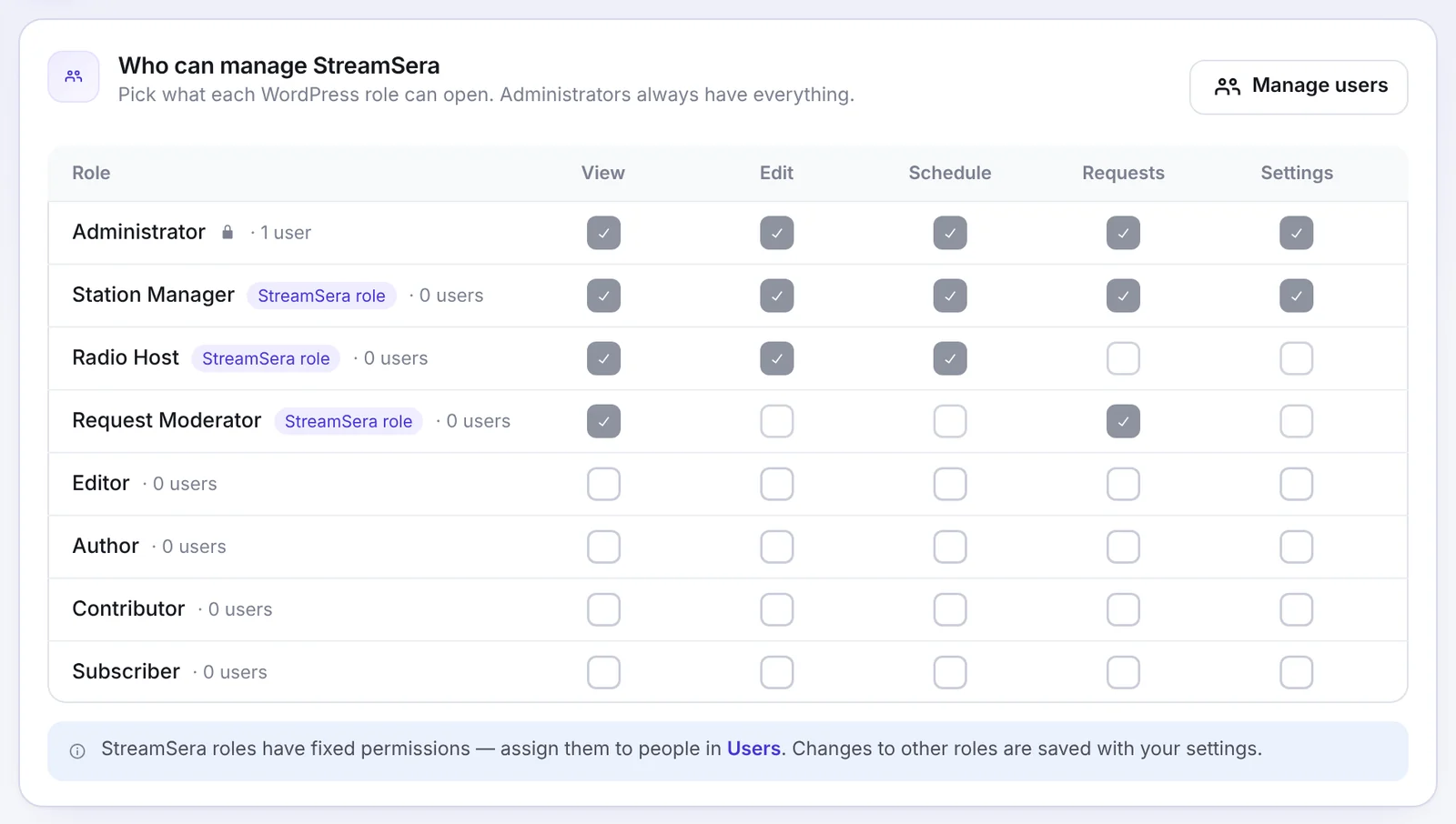
- View: the dashboard and stations.
- Edit: stations and players.
- Schedule: schedule, shows and hosts.
- Requests: requests, shout-outs and history.
- Settings: settings and tools.
Administrators always have everything. Click Manage users to jump to the users list.
Free version#
In the free plugin, StreamSera is managed by administrators. Developers can change the required capability with the streamsera_required_cap filter.
Was this article helpful?