

TuneSera comes in two parts: a free plugin on WordPress.org and TuneSera Pro, a paid add-on. A common question we hear is simple: do I actually need Pro? For many sites the honest answer is no, at least not at first. This guide compares TuneSera Free vs Pro feature by feature and helps you decide when upgrading makes sense.
The short answer
Start with the free plugin. It gives you a complete, working radio directory: search and filters, station pages, country, genre and language browse pages, a sticky player and 1,186 ready-to-import stations. Upgrade to Pro when you need more stations than the bundled 30 countries, want to understand your listeners, or want more control over how the directory looks and behaves.
What you get in the free plugin
- A searchable directory with country, genre and language filters, sorting, list and grid layouts, and filter chips
- Station pages with logos, descriptions, genres, location, broadcast details, contact and social links, related stations and RadioStation structured data
- Location archives for countries, divisions and cities, plus browse pages for countries, genres and languages
- A sticky player that keeps playing across pages, with now-playing song titles when the stream shares them
- Imports of 1,186 bundled stations from 30 countries, CSV files with standard columns, and manual entry with a stream tester
- Design controls for layout, station cards and colors, with four presets
- Shortcodes for the directory, station listings, single stations, search and browse pages, plus a visual Shortcode Builder
- Sharing by link, WhatsApp, Facebook, X, email and the native share sheet
That’s enough to launch and grow a real radio directory. Our step-by-step guide builds a complete site using only the free plugin.
What TuneSera Pro adds
More stations: the global catalog
Pro unlocks the TuneSera station catalog of 70,000+ stations in 230 countries. It imports exactly like the bundled directory, in batches that run in the background, and you can save station logos to your own Media Library instead of loading them from their original addresses.
Imports from any spreadsheet
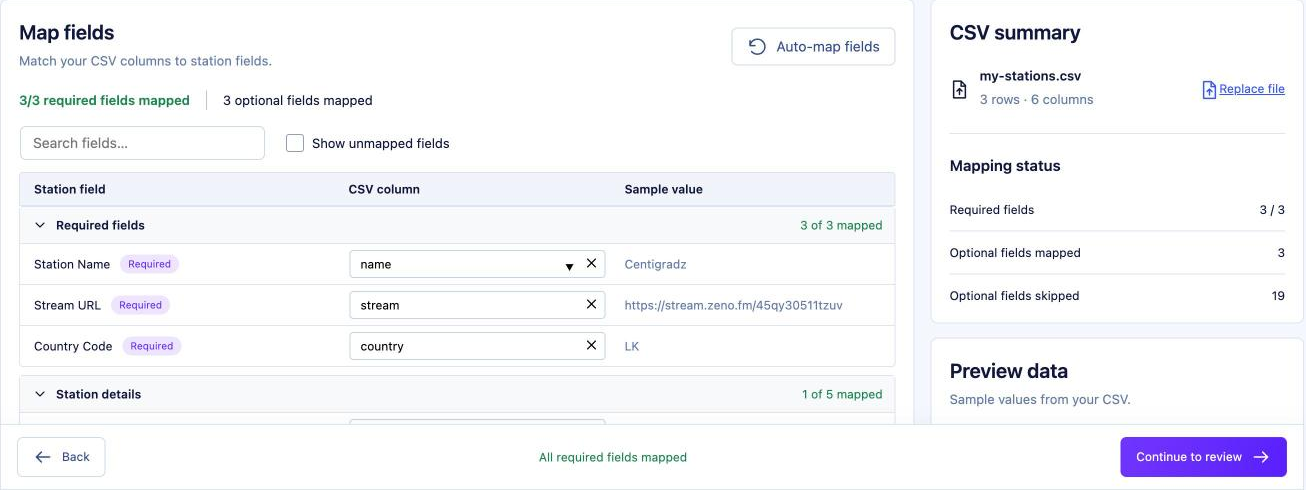
With CSV field mapping you can import a spreadsheet with any column names. Map each column to a station field, preview sample rows, and skip what you don’t need.
Smarter discovery
- Local discovery starts each visitor on stations from their own country, so a listener in Brazil sees Brazilian stations first.
- Featured stations let you hand-pick and order stations to highlight anywhere with a shortcode.
- Popular stations rank stations by real plays on your site over the last 30 days, with a Popular sort option for the directory.
Listening analytics
Pro records successful plays, listeners, listening time and playback health, stored in your own WordPress database. Five reports cover the overview, individual stations, your audience, playback health and live listeners, and you can get scheduled email reports.

A richer player
Choose from extra sticky player styles, show the player before anyone presses play with a default station, open a popup player that keeps going when the tab closes, add a sleep timer, and show track artwork for the current song.
Finer design control
Pro adds typography, spacing, card shape and button controls, station page layout options, and separate layouts for archive pages. It also adds the player, locations, featured and popular station shortcodes.
Free vs Pro comparison table
| Feature | Free | Pro |
|---|---|---|
| Directory with search, filters, list and grid | ✓ | ✓ |
| Station pages and location archives | ✓ | ✓ plus layout options |
| Sticky player with now-playing titles | ✓ | ✓ plus styles, popup, sleep timer, artwork |
| Importable stations | 1,186 in 30 countries | 70,000+ in 230 countries |
| CSV import | Standard column names | Any column names with field mapping |
| Station logos | Original URLs | Optional copy in your Media Library |
| Local discovery | — | ✓ |
| Featured and popular stations | — | ✓ |
| Listening analytics and email reports | — | ✓ |
| Colors and presets | ✓ | ✓ |
| Typography, spacing and buttons | — | ✓ |
| Shortcodes | Directory, stations, station, search, browse | Adds player, locations, featured, popular |
Which one should you choose?
Stay on Free if…
- Your directory covers one or a few of the 30 bundled countries, or your own station list
- You’re testing the idea and want to launch quickly
- You’re happy with the standard layouts and color controls
Upgrade to Pro if…
- You want a global directory or a country that isn’t in the bundled set
- Your audience is international and local discovery would help them find relevant stations faster
- You want to know which stations people actually listen to, and which streams are failing
- You run a station or network and want a default station, a popup player or a “Listen live” player on your homepage
- You need pixel-level design control to match a brand
Upgrading is painless
TuneSera Pro installs alongside the free plugin, which must stay active. Your stations, locations, genres and settings stay exactly as they were, the PRO badges disappear, and Pro options become available straight away. If you ever deactivate Pro or your license expires, your directory keeps working with the free features and no stations are lost.
Frequently asked questions
Can I try the free plugin first and upgrade later?
Yes, and we recommend it. Everything you build with the free plugin carries over when you add Pro.
Are Pro features hidden in the free plugin?
No. You’ll see Pro options marked with a PRO badge, so you always know what’s available. The badges disappear once your Pro license is active.
What happens if my Pro license expires?
Your directory keeps running on the free features. Your stations and settings stay in place.
Still deciding? Read Introducing TuneSera, browse the Pro installation guide, or ask the WPSera team.


Join the conversation