

The free TuneSera plugin gives you a complete radio directory. TuneSera Pro is for when you want to go bigger: more stations, smarter discovery, real listening data and finer control over every pixel. Here’s a tour of the TuneSera Pro features and what each one does for your site and your listeners.
1. The global station catalog: 70,000+ stations
The free plugin bundles 1,186 stations from 30 countries. Pro unlocks the TuneSera station catalog: more than 70,000 stations across 230 countries, ready to import the same way.
- Go to TuneSera → Import Stations. The country list now shows all 230 countries.
- Click Sync with directory to load the latest station counts.
- Tick the countries you want and start the import. Stations arrive in batches in the background, so even countries with thousands of stations import reliably.
If a connection or license check fails, the import pauses instead of losing work, and you can resume it from Import history.
Logos in your own Media Library
Turn on Download station logos to the Media Library during an import and every logo is saved to your site with a readable file name based on the station. Logos then load from your own server and keep working even if the original disappears.

2. Import any spreadsheet with field mapping
Have a station list with your own column names? Pro’s field mapping matches each CSV column to a station field. Click Auto-map fields, fill in the rest, preview sample rows, and skip anything you don’t want. No renaming columns in your spreadsheet first.
3. Local discovery
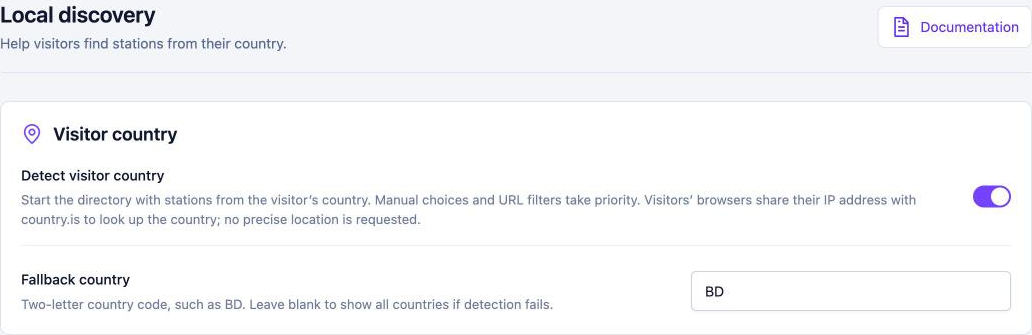
With local discovery, each visitor’s directory starts on stations from their own country. A listener in Brazil sees Brazilian stations first, and a listener in Bangladesh sees Bangladeshi ones. Set a fallback country for visitors whose location can’t be detected.
Visitors stay in control: choosing a different country, or all countries, always wins. The lookup uses the free country.is service, requests no precise location and shows no permission prompt. Local discovery is off by default, so you decide when to use it.
4. Featured and popular stations
Featured stations let you hand-pick stations to highlight, such as your own station, partners or listener favorites. Drag them into the order you want, then show them anywhere with [tunesera_featured_stations].

Popular stations rank stations by successful plays on your site over the last 30 days, then by listening time. Use the Popular sort in your directory, or show the top stations with [tunesera_popular_stations]. On a brand-new site, TuneSera falls back to listener counts from the station data so the list is never empty.
5. Listening analytics, on your own site
Pro shows how people actually use your directory: successful plays, unique listeners, listening time, who’s listening right now and how reliably each stream plays. Five reports cover the Overview, Stations, Audience, Playback Health and Live listeners, with filters by date, station, country, device and source.

All analytics data is stored in your own WordPress database and nothing is sent to WPSera or any third party. No raw IP addresses or visitor names are collected, and you can require consent before any tracking starts. Prefer your inbox? Turn on scheduled email reports, daily or weekly.
6. A more capable player
- Player styles for the sticky player
- Always show the player with a default station, ready to play on every page
- Popup player that keeps playing even after the visitor closes your tab
- Sleep timer with presets you choose
- Track artwork and finer control over how now-playing data refreshes and caches
[tunesera_player]to put a standalone “Listen live” player anywhere
Read more in How to Add a Live Radio Player to Your WordPress Site.
7. Design control down to the pixel
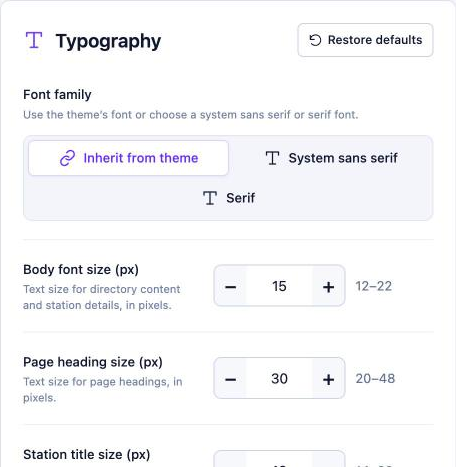
Pro adds typography (or inherit fonts from your theme), spacing and shape controls for content width, padding, grid gaps and card corners, and button styles for play buttons. Station pages get layout options such as header alignment, logo size and sidebar position, and archive pages can have their own view and columns.
8. More shortcodes
Pro adds [tunesera_player], [tunesera_locations] for browsing countries, divisions, cities or regions, [tunesera_featured_stations] and [tunesera_popular_stations]. All of them are in the visual Shortcode Builder.
How to get TuneSera Pro
- Keep the free TuneSera plugin installed and active.
- Buy a license on the TuneSera pricing page. You’ll receive a download link and license key by email.
- Upload the Pro ZIP under Plugins → Add Plugin → Upload Plugin, activate it and follow the prompt to activate your license.
Your stations and settings stay exactly as they were. The PRO badges disappear, and new Analytics and Account menu items appear. Pro updates arrive through the normal WordPress updates screen.
Not sure yet? Our Free vs Pro comparison helps you decide.
Frequently asked questions
Does TuneSera Pro replace the free plugin?
No. Pro is an add-on that runs alongside the free plugin, which must stay active. Keep both on the same version.
Is my analytics data shared with WPSera?
No. Listening analytics is stored in your own database and never leaves your site.
What if I stop using Pro?
Your directory keeps working with the free features, and no stations are lost.

Join the conversation